Convography

Inside Convography

Every tool your thinking needs.
One connected place.

Convography brings conversation, source material, visual creation, and multi-model workflows together—so you can explore every useful path, compare the results, and synthesize the strongest work.

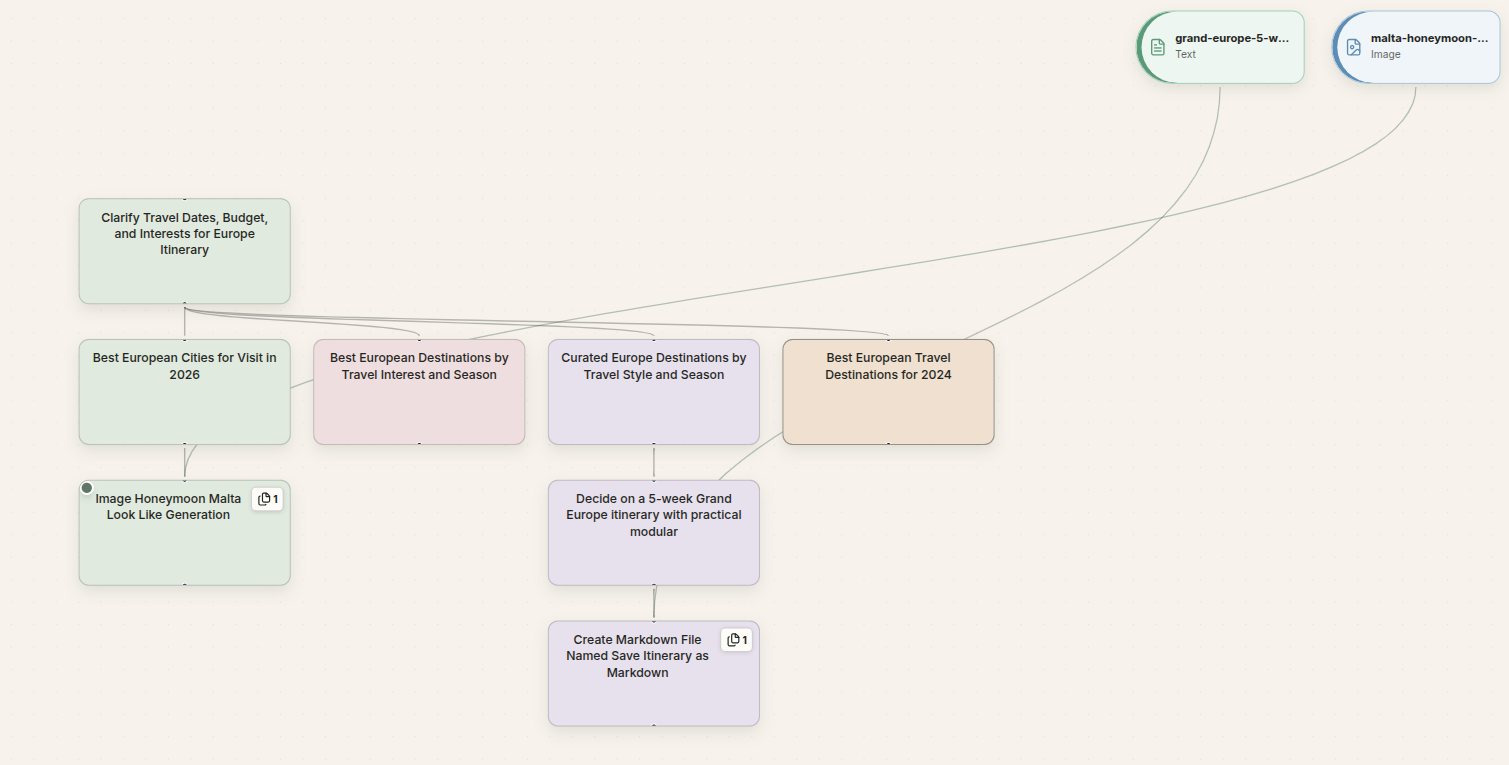
Convography workspace showing a connected conversation graph

Product tools

Everything you need stays in the flow.

The essentials of AI work belong together. Convography keeps the conversation, its source material, its visuals, and the way you share it in one coherent workspace.

01

Chat

A conversation that makes room for every direction.

Start naturally, ask follow-up questions, and change models without changing your workspace. Every response stays connected to the conversation that produced it, so exploration never has to mean starting over.

  • Work with leading models in one interface
  • Continue from any earlier message
  • Keep context visible as the conversation grows
02

Files

Bring the source material into the conversation.

Add the documents behind the work and discuss them where your thinking happens. Files remain part of the relevant conversation path, making it easier to move from source material to questions, analysis, and finished output.

  • Upload source material alongside a prompt
  • Use files as context for analysis
  • Keep evidence connected to the branch that uses it
03

Images

Create and refine visuals without breaking your flow.

Move from an idea to a generated image in the same workspace where the concept was developed. Iterate from the relevant branch, preserve earlier directions, and keep the visual work beside its context.

  • Generate images from the conversation
  • Iterate while preserving earlier versions
  • Keep visual and written thinking together
04

Sharing

Share the whole graph—or only the path that matters.

Turn connected thinking into something another person can follow. Share a complete conversation graph when the process matters, or focus attention on one branch when the conclusion is what counts.

  • Share a full graph or a selected branch
  • Let recipients follow the surrounding context
  • Keep the original workspace under your control

Connected workflows

Go beyond the answer.

These four capabilities turn individual AI interactions into a visible process for exploring, evaluating, and finishing substantial work.

05

Visual workflows

See the shape of the work.

Convography turns a conversation into a navigable graph. Branch from any message, explore an alternate path, and return to the main thread without losing either direction.

One workspace, many connected paths.
06

Auto routing

Let each task find the model that fits.

Auto mode considers the request in front of it and routes the turn to an appropriate supported model. You stay focused on the work while Convography handles the provider choice.

Model selection becomes part of the workflow, not another chore.
07

Compare & contrast

Put strong alternatives beside each other.

Develop different approaches as parallel branches, or send one prompt to OpenAI, Gemini, Claude, and Grok together. Every provider response stays distinct and inspectable in the graph.

Compare provider perspectives without flattening their reasoning.
08

Synthesize

Select the strongest branches. Build one connected result.

Choose two or more completed text nodes, write the synthesis instructions, and stream one assistant response grounded in every selected path. Or use Send All and Synthesize to collect four provider responses before Convography combines the completed perspectives automatically.

Every selected source keeps a visible edge to the synthesis.

One connected workspace

Start with one question.
Keep every useful direction.

Try the full Convography experience with chat, files, images, sharing, and connected multi-model workflows.

Start your free trial No API keys · Free Pro trial · Cancel anytime